Table of Content
- Step 1 : Navigate to Custom JS
- Step 2 : Insert the Custom JS
- Step 3 : Change the Slider API ID
- Result : Slider Example
Step 1
Navigate to your main slider’s “Custom JavaScript” section:
/faq/custom-css-javascript/
Step 2
Add to the Slider (Main Slider with bullets) the code below
document.addEventListener("sr.slide.beforeChange", function (e) {
  	if (e.id == revapi1.id) revapi2.showSlide(e.next.index);
});
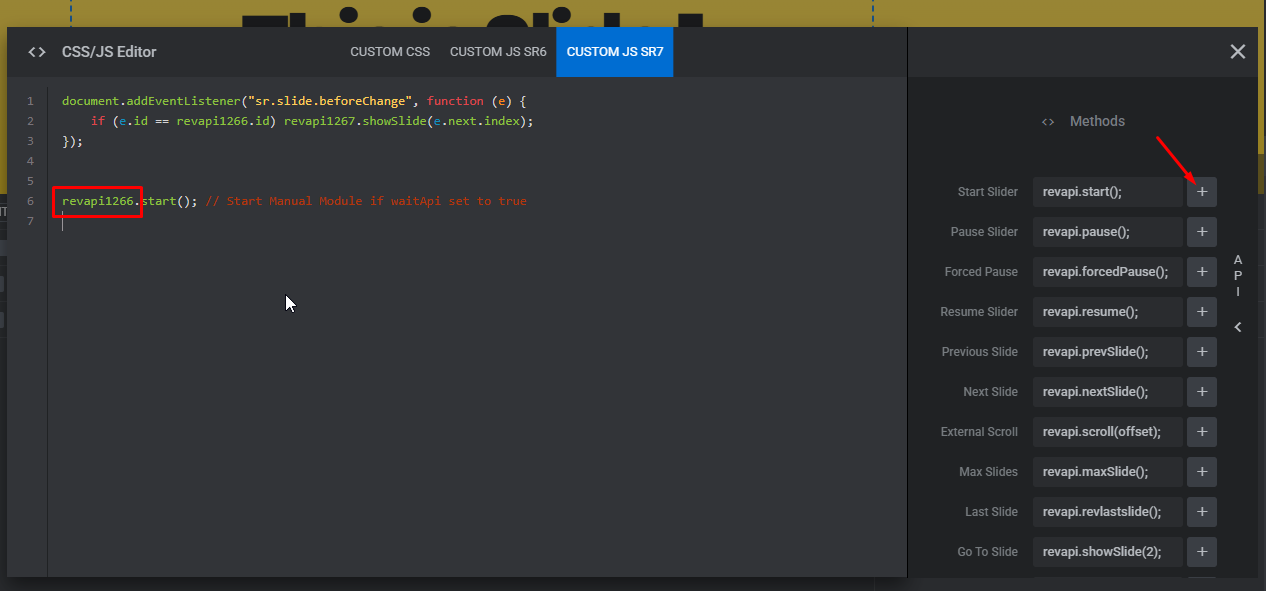
Step 3
Change the revapi id’s for both sliders
Slider 1 (Main Slider) – revapi1
Slider 2 (Secondary Slider) – revapi2
Note : You can find the Slider API number in the Slider API “Methods”
Result :
Clicking on the Navigation Bullets/Arrows will trigger the slide change automatically on another slider.
How to trigger a Slide change on another Slider